
Plans, Add-ons, & Upgrades
Overview
Kira offers multiple subscription plans to support different usage needs. Plans include recurring credits and access to paid features. Users can upgrade, downgrade, or add extra credits at any time through the pricing page.
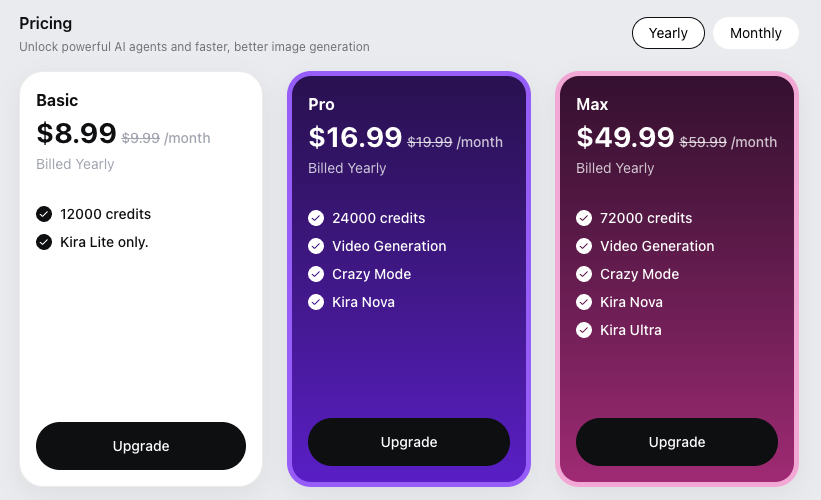
For current pricing and plan details, visit:
Basic vs Pro vs Max
Here’s a clear, user-facing explanation of the three plans, written so it can be reused on your pricing page, Help Center, or in chat replies.
Basic Plan
Best for getting started or light usage
1000 credits (monthly) / 12,000 credits (yearly)
Access to the Kira Lite Mode
Suitable for simple generations and edits
No advanced modes
Choose Basic if you want to try Kira with a lower commitment and don’t need advanced models or special modes.
Pro Plan (Most Popular)
Best for regular users and creators
2000 credits (monthly) / 24,000 credits (yearly)
Unlimited access to models
Includes Kira Lite & Nova
Video Generation
Better flexibility and creative control
Choose Pro if you use Kira frequently and want access to all models plus more expressive interaction modes.
Max Plan
Best for power users and heavy usage
6000 credits (monthly) / 72,000 credits (yearly)
Unlimited access to models
Includes Kira Lite, Nova & Ultra
Video Generation
Designed for high-volume generation and editing
Choose Max if you generate or edit images at scale and want the highest credit allowance with no model limitations.
Quick Comparison
Plan | Credits | Models | Video Generation | Best For |
|---|---|---|---|---|
Basic | 12,000 | Kira Lite | ❌ | Light / casual use |
Pro | 24,000 | Kira Lite, Nova | ✅ | Regular creators |
Max | 72,000 | Kira Lite, Nova, Ultra | ✅ | Power users |
Subscription Plans
Kira subscriptions:
Renew on a recurring billing cycle (monthly or yearly, depending on the plan)
Include a set number of credits per billing period
Unlock paid-only features such as advanced modes (e.g. Thinking Mode, Crazy Mode)
Each plan is designed for different usage levels.
Credits in Subscription Plans
Subscription credits are granted at the start of each billing period
Subscription period begins at the time of initial purchase and is calculated from that date (not from the time of a mid-cycle upgrade).
Credits are used for image generation and editing
Unused credits do not roll over to the next billing cycle unless otherwise stated
Credits reset when your subscription renews.
Add-on Credits
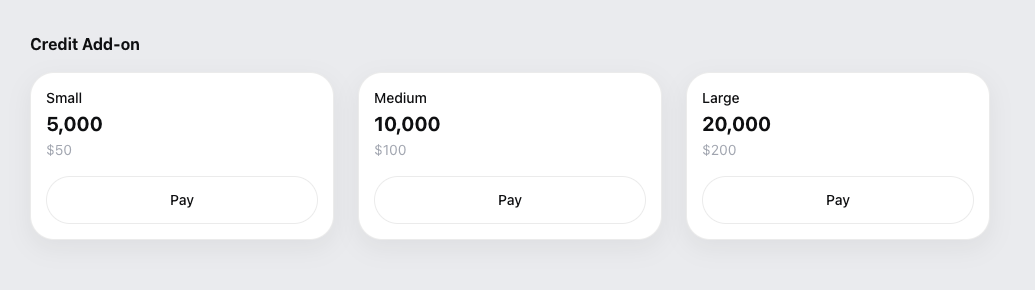
Users can purchase credit add-ons if they need more credits than their plan includes.
Add-on credits are used in addition to your plan credits
They are consumed when generating or editing images
Add-on credits do not expire
Add-ons are useful for spikes in usage (eg. if you run out of credits within the current billing cycle).
Upgrading Your Plan
You can upgrade your plan at any time.
When you upgrade:
The new plan takes effect immediately
You gain access to the higher plan’s features right away
You can upgrade your plan at any time.
When you upgrade within your current billing period:
You'll be charged the full price of your new plan.
The full credit allocation for your new plan will be added to your account immediately.
Your subscription billing cycle will reset, and your new renewal date will be based on the date of your upgrade.
Your existing subscription value is applied toward the upgrade.
In some cases, unused value from your current plan may be prorated toward the upgrade.
Downgrading Your Plan
If you downgrade:
The downgrade typically takes effect at the next billing cycle
Your current plan and features remain active until renewal
Credits included in the current plan remain usable until the end of the cycle
Downgrading does not refund already-used credits.
What Happens When My Subscription Ends?
If your subscription expires or is canceled:
Paid features are no longer accessible
You will not receive new subscription credits
Any remaining subscription credits may expire at the end of the billing period
Your account and existing images remain accessible
You can resubscribe at any time to regain access.
Common Questions
Do credits carry over to the next month?
No. Subscription credits reset each billing cycle unless explicitly stated otherwise.
What happens to my credits if I upgrade mid-cycle?
Your plan updates immediately. The full credit allocation for your new plan will be added to your account immediately.
Can I use add-on credits without a subscription?
No.
Will I lose my images if I cancel?
No. Canceling a subscription does not delete your account or existing images.
Can I switch plans multiple times?
Yes, but frequent changes may affect billing or credit calculations.
How to cancel my plan?
Please read here
Managing Your Plan
You can manage your subscription, upgrades, and add-ons from:
https://kira.art/setting/billing
Your account dashboard
The billing or subscription settings page
All changes are reflected in real time.